
Free Whiteboard Animation Maker: Turn Images into Drawing Videos
Turn your storyboard images into hand-drawn whiteboard videos instantly in your browser.
00-00.png, 00-05.png, 00-12.png to set scene lengths automatically. If filenames have no timestamps, each image gets 10 seconds.Choose images
Each image becomes an independent scene in your video.
Add Voiceover (Optional)
Upload an audio file to automatically sync the scenes to your voice.
Adjust Settings
Make Whiteboard Animation Videos from Your Own Images, Free and Without a Watermark
The ClearAITools Whiteboard Animation Maker turns your finished pictures into a hand-drawn whiteboard video. You supply the images, the tool draws each one on screen stroke by stroke, and you export an MP4 directly from your browser. Add a voiceover, choose landscape or vertical format, and use timestamps in the file names to control exactly when each scene starts.
Unlike template-based editors, this tool is built for one job: converting images to whiteboard animation quickly. If you already have a storyboard, diagrams, sketches, or AI-generated line art, you can have a preview in minutes.
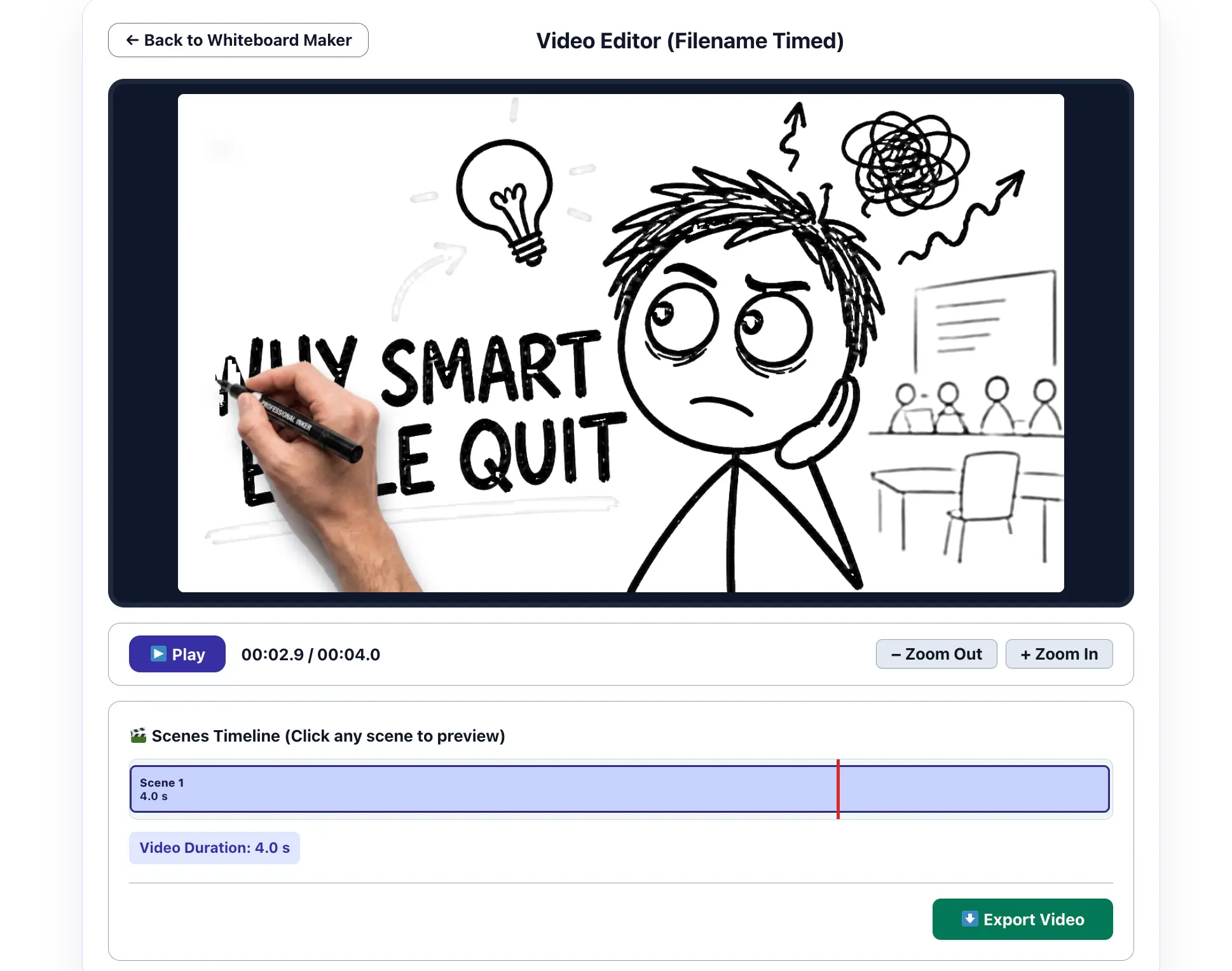
A quick look inside the Whiteboard Animation Maker workspace.
What Is Whiteboard Animation?
Whiteboard animation is a video style that simulates someone drawing on a whiteboard while a narrator explains an idea. The viewer watches each picture appear gradually, which keeps attention on one point at a time. That is why it is popular for explainer videos, online lessons, training material, and product walkthroughs.
Traditional whiteboard videos are made in dedicated software such as VideoScribe or browser editors such as Renderforest. This tool takes a simpler route: you bring finished images and it creates the drawing-style reveal.
How to Make a Whiteboard Animation Video from Images
Quick answer: To make a whiteboard animation video from images, upload one image per scene, optionally add a voiceover, choose 720p or 1080p and an aspect ratio, preview the drawing effect, and export an MP4. It runs in your browser with no installation and no watermark.
Watch this quick tutorial to see how easy it is to create your whiteboard video.
- Prepare your images. Create one image per scene. JPG and PNG files work well.
- Add your images. Click Choose images or drag files into the upload area. Remove single images or use Clear all images to start over.
- Upload a voiceover (optional). Add an MP3 or WAV recording if you want narration. You can remove or replace it without refreshing the page.
- Choose video settings. Pick 480p, 720p or 1080p, and Auto, 16:9 or 9:16. Turn the drawing hand and colored ending on or off.
- Preview the animation. Click Preview & Create Video and use the playback controls and scene timeline to check the result.
- Export your MP4. Click Export Video and wait for rendering to finish. After export, select a star rating to enable the download button; a written comment is optional.
Tip: For the clearest result, start with high-contrast artwork or diagrams that are easy to recognize as they are drawn.
Control Scene Timing with Image Filenames
Instead of entering the start time of every scene by hand, name each image with the time it should begin, written as minutes-seconds. The gap between two consecutive timestamps becomes the length of the earlier scene. If filenames contain no valid timestamps, every image gets 10 seconds and your selected order is kept.
| Example filename | Scene begins | Time until next scene |
|---|---|---|
00-00.png | 00:00 | 5 seconds |
00-05.png | 00:05 | 7 seconds |
00-12.png | 00:12 | 8 seconds |
00-20.png | 00:20 | Final scene length depends on the remaining timeline and editor settings |
Each scene’s time includes both the drawing effect and the display of the finished image. Keep timestamps in ascending order and preview the result, especially the last scene.
How to Make a Whiteboard Animation with Voiceover
A narrated whiteboard video works best when the images follow the script. A simple workflow:
- Record or generate your narration and note the second where each new idea begins.
- Name each image with that start time (for example
00-00.png,00-14.png,00-31.png). - Upload the images, then upload the audio file in step 2.
- Keep Sync scenes with audio automatically enabled and check the timeline in the preview.
- If a scene changes too early or too late, rename that file with a corrected timestamp, re-add it, and preview again.
Short scenes of one idea each, roughly matching one or two sentences of narration, usually feel more natural than long scenes with a single image.
Vertical Whiteboard Animation for TikTok, Instagram Reels and YouTube Shorts
Choose 9:16 in the aspect ratio setting to export a vertical video for TikTok, Reels and Shorts. Design your images with that shape in mind: place the main drawing in the center, keep text large, and avoid thin details near the edges. Choose 16:9 for regular YouTube videos, lessons and slide-style presentations, or Auto to let the tool decide from your images.
Best Images for Whiteboard Animation: Sketches, Line Art, Diagrams and AI Images
The drawing effect is most convincing when the picture looks like something that could be sketched by hand.
| Image type | How it looks | Recommendation |
|---|---|---|
| Black line art on white | Clear, clean strokes | Best choice |
| Diagrams, flowcharts, icons | Easy to follow step by step | Very good for tutorials and training |
| Hand-drawn doodles and sketches | Natural whiteboard feel | Very good; scan or photograph in good light |
| AI-generated sketches | Depends on the prompt | Ask for a simple black-and-white drawing on a plain white background |
| Busy photographs | Less convincing drawing effect | Use sparingly or simplify first |
How to Create Storyboard Images for Your Whiteboard Video
- Write the script first. Break it into short scenes of one idea each. The Free AI Blog Post Outline Generator can help structure the points, and the Free AI Text Summarizer can shorten a long script into scene-sized pieces.
- Create one image per scene. The Free AI Image Prompt Generator can write prompts for tools such as Midjourney and DALL-E, for example a simple black-and-white hand-drawn sketch on a plain white background.
- Name the files with timestamps. Use the
00-00.pngpattern to set scene timing automatically. - Export, then publish. The Free AI YouTube Video Description Generator helps with the description, and the Free AI SEO Meta Description Generator is useful if you embed the video on your own page.
Whiteboard Video Ideas for Teachers, YouTubers, Marketers and Small Businesses
Teachers and online courses
Illustrate a math problem, science process, grammar rule or historical timeline with one visual per step, narrated so students can follow while each image is drawn. Exported videos are fully compatible with any Learning Management System (LMS) or classroom portal.
YouTube explainers and storytelling
Turn a storyboard into a story video or a faceless explainer channel. Use timestamps in the file names to match your narration.
Product, process and onboarding videos
Show how a service works, outline a customer journey, or explain an internal process with simple diagrams. The format suits step-by-step explanations well.
Short social videos
Create quick vertical tips, definitions or how-to clips for TikTok, Reels and Shorts from three to six images.
Whiteboard Animation Maker Features
- Images to animated scenes: convert static pictures into a continuous drawing-style video.
- Automatic timing from filenames: set scene boundaries with time-coded names.
- Optional voiceover: add narration and use audio sync to align scenes.
- Drawing hand effect: show or hide a hand during the animation.
- Colored ending: reveal the finished image in color after the drawing.
- Flexible formats: 16:9, 9:16 or automatic, at 480p, 720p or 1080p.
- Preview and timeline: inspect playback and jump between scenes before exporting.
- MP4 export: download a video for presentations or compatible platforms.
- Free, no installation, no watermark: exported videos carry no ClearAITools watermark.
ClearAITools vs Other Whiteboard Animation Tools
Different tools solve different problems. This is a general guide; features and pricing change, so check each provider for current details.
| Tool | How it works | Best when |
|---|---|---|
| ClearAITools Whiteboard Maker | Upload your own finished images, get a drawing-style reveal, export MP4 in the browser. | You already have your scenes and want a quick, free video without a watermark. |
| Renderforest | Online editor with templates and AI features; free to start, paid upgrades. | You want templates and a guided editor. |
| FlexClip | Online video editor with whiteboard templates, AI tools and a media library. | You want to mix whiteboard scenes with text, music and other video elements. |
| VideoScribe | Dedicated whiteboard software with a built-in image library. | You make many branded videos and want deeper creative control. |
Limitations to Know Before You Start
- It does not create the artwork. You supply the images; the tool animates how they are revealed.
- It is a drawing-style reveal. Line art and diagrams look best; busy photographs look less convincing.
- It is not a full video editor. You can adjust timing, audio sync, size, the hand overlay and the colored ending, but not add templates or text layers.
- Performance depends on your device. Rendering happens in your browser, so long projects or large images can be slow. Test with a few scenes first.
Choosing the Right Video Size
16:9 suits conventional YouTube videos and presentations. 9:16 suits vertical social video. Auto lets the tool pick from your content. Choose 720p for a balance of file size and processing effort; 1080p gives more detail but may take longer to render on some devices. For long projects, try a short test export first.
Privacy, File Handling and Ratings
Image and audio processing for the video happens in your browser rather than requiring you to upload the source media to the video maker’s server. The rating feature is separate: when you select stars after exporting, your rating (and any optional comment) is submitted to the website so it can display genuine user feedback. See the privacy policy for details on analytics, advertising and rating data.
After exporting, selecting a star rating enables the download button. Any rating from one to five stars is accepted. The latest published ratings appear below this guide when available.
Frequently Asked Questions
Is this whiteboard animation maker free?
Yes. It is free to use, with no subscription required and no ClearAITools watermark on exported videos.
How do I make a whiteboard animation video from images?
Upload one image per scene, optionally add a voiceover, choose quality and aspect ratio, preview the drawing effect, and export an MP4. The steps are listed in the how-to section above.
Can I create a whiteboard animation from JPG or PNG images?
Yes. Add your JPG or PNG images in the upload area, preview the animation, and export the result as an MP4.
Can I convert my own drawings or sketches into a whiteboard animation?
Yes. Scan or photograph your drawings in good light, ideally on white paper with dark lines, and upload them as images. Clear, high-contrast sketches give the best drawing effect.
Can I use AI-generated images for whiteboard animation?
Yes. Ask your image generator for a simple black-and-white hand-drawn sketch on a plain white background. The Free AI Image Prompt Generator can help you write the prompts.
How do image filename timestamps work?
Name images with start times such as 00-00.png, 00-05.png and 00-12.png. The gap between consecutive timestamps sets the scene length. Without timestamps, each image gets 10 seconds and your order is kept.
Can I add a voiceover to my whiteboard video?
Yes. Upload an audio file, keep automatic audio synchronization on, and check the timeline in the preview before exporting.
Can I make a vertical whiteboard video for TikTok, Reels or Shorts?
Yes. Select the 9:16 aspect ratio before creating the video, and design your images with the main content in the center.
Does the whiteboard animation maker add a watermark?
No. Exported videos do not include a ClearAITools watermark.
Does it work without installing software?
Yes. It runs in a compatible web browser. Export speed and video processing support can vary by browser and device.
Can I use it on a phone?
The page is designed to work on mobile screens. Because rendering happens in your browser, export time depends on your phone and browser, so try a short test project first.
What file format can I download?
The tool exports MP4 video files. Choose your resolution and aspect ratio before creating the video.
Do I have to leave a written review to download?
No. Selecting a star rating activates the download button, but writing a comment is optional. Ratings from one to five stars are accepted.
Can I replace my images or audio without refreshing the page?
Yes. Use Clear all images or Remove audio under the upload areas, or reset all files and settings to start a new project.
Real User Ratings & Reviews
Recent feedback from people who exported a video with this tool.