
Tip: a specific idea gives better prompts. Press Ctrl + Enter (Cmd + Enter on Mac) to generate.
Last updated: October 2026
How to Use the AI Image Prompt Generator
Image generators work best when they get a precise description: who or what is in the picture, where it is, how it is framed, how it is lit, and what style it should have. Most people start with a short idea such as “a robot drinking coffee.” This free tool turns a rough idea into three detailed prompt variations, written for the tool you plan to use. You choose the target tool, visual style, aspect ratio, lighting, and things to avoid.
In short: Describe your image, choose where you will use the prompt, and click “Generate prompts.” You get three different concepts of your idea, each with a copy button. Paste the one you like into your image tool, and refine it one detail at a time.
A note about DALL-E: this page used to mention DALL-E 3. OpenAI removed DALL-E 2 and DALL-E 3 from its API on May 12, 2026, and ChatGPT now creates images with newer GPT Image models. That is why this tool is built for Midjourney and ChatGPT Images, with options for Stable Diffusion style tools and other generators.
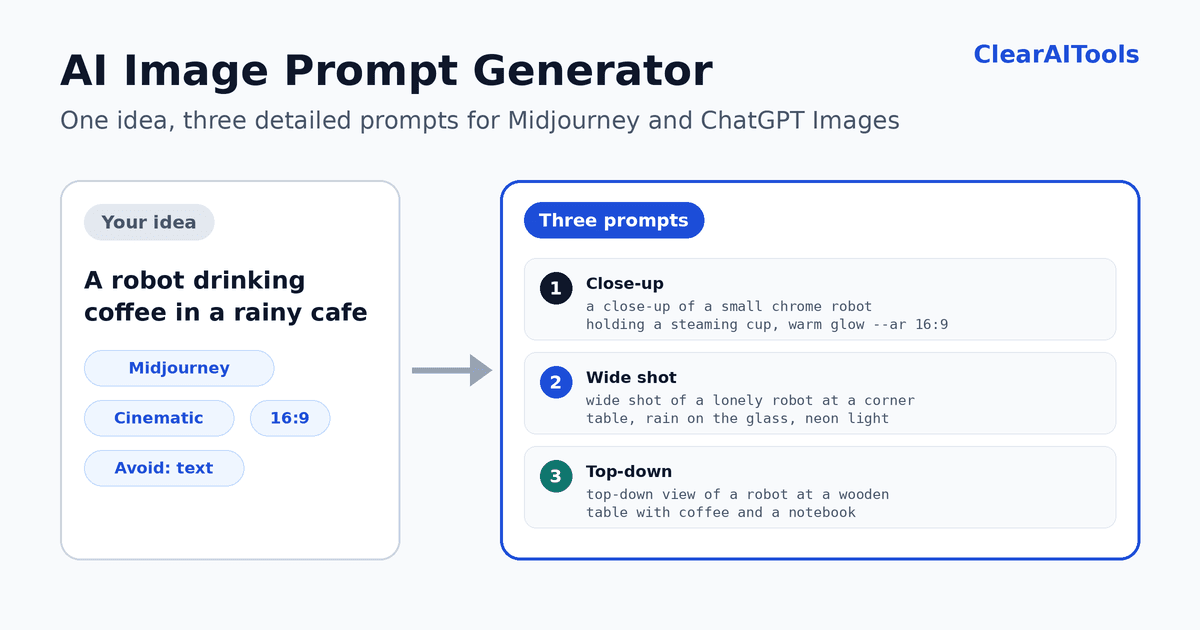
- Describe your image. Write the main subject and anything important. Click “Try an example” to see how it works.
- Choose the tool. Midjourney, ChatGPT Images, Stable Diffusion style tools, or any other tool.
- Choose style, aspect ratio, and lighting. Leave them on “Best fit” if you are not sure.
- Add things to avoid (optional). For example, “text, logos, people.”
- Choose the prompt language. English is recommended, because most image models usually follow English best. You can also keep your own language.
- Generate, copy, and test. Try all three variations, then adjust.
How the Prompt Changes for Each Tool
| Tool | Prompt format you get | Notes |
|---|---|---|
| Midjourney | One line of precise descriptive phrases, followed by parameters such as --ar and --no. | Parameters go at the end. Supported parameters can differ between Midjourney versions. |
| ChatGPT Images | Natural, fluent sentences, like a brief to an illustrator or photographer. | No parameters. Refine the result with follow-up messages. |
| Stable Diffusion style tools | A comma-separated list of descriptive phrases, plus a separate negative prompt. | Paste the negative prompt into the negative prompt field. Settings vary between tools. |
| Any other tool | One clear descriptive paragraph. | Adapt it if your tool has its own prompt format. |
The Anatomy of a Good Image Prompt
Strong prompts usually describe the picture in the same order a photographer or art director would think about it:
- Subject. What or who is in the image, with concrete details such as appearance, materials, pose, and action.
- Setting. Where it happens and what is in the background.
- Composition and camera. Close-up, wide shot, top-down view, low angle, shallow depth of field.
- Lighting. Golden hour, soft studio light, neon, overcast daylight.
- Color and mood. Warm and cozy, cold and lonely, vibrant and playful.
- Style or medium. Photograph, watercolor, 3D render, flat vector illustration.
Example: from a short idea to a detailed prompt
This is an illustrative example.
Short idea
A robot drinking coffee.
Detailed prompt (natural language style)
A small chrome robot sits alone at a corner table in a quiet cafe, holding a steaming ceramic cup with both hands. Rain streaks the large window behind it, and neon reflections glow on the wet glass. Shot as a cinematic wide composition with shallow depth of field, warm tungsten light inside the cafe, and a cool blue night outside.
Detailed prompt (Midjourney style)
small chrome robot holding a steaming ceramic cup, alone at a corner cafe table, rain streaking the window, neon reflections on wet glass, warm tungsten light, cool blue night, shallow depth of field, cinematic film still –ar 16:9 –no text, logos
The second and third versions add the subject details, the setting, the framing, the lighting, and the mood, which gives the image model far more to work with than the original six words.
Midjourney Parameters in Brief
In Midjourney, parameters are added at the end of the prompt, after the description. According to the Midjourney parameter list, they should not have punctuation after them, and no prompt text should come after them. The generator adds these for you:
--arsets the aspect ratio, such as--ar 16:9for a wide image.--notells Midjourney what to leave out, such as--no text, logos.
Midjourney also offers parameters for stylization, variety, versions, and more (for example --stylize, --chaos, and --version). Which ones work, and how, can depend on the model version you use, so check Midjourney’s documentation for your version before adding them.
Tips for Better Images
- Start with one clear subject. Too many subjects in one prompt usually lead to messy results.
- Change one thing at a time. If you change the subject, style, and lighting together, you will not know what helped.
- Avoid contradictions. A prompt that asks for a photograph and a watercolor at once confuses the model.
- Be specific, not flowery. “Soft window light from the left” says more than “beautiful lighting.”
- Be careful with text in images. Generators often misspell letters. If you need text, put the exact words in quotation marks and check the result.
- Use the avoid list. Naming what you do not want, such as extra objects or clutter, can clean up results.
- Expect variation. The same prompt can produce different images each time, so generate several.
Responsible Use
Important: The tool does not write prompts for sexual or explicit content, graphic violence, hateful imagery, or realistic images of real, identifiable people. Follow the rules of the image tool you use, and do not use AI images to mislead people.
- No artist or brand names. The tool describes styles in plain words instead of naming living artists, studios, characters, or brands.
- Check the tool’s terms. Whether you can use generated images commercially depends on the terms and plan of the tool you use, so read them before publishing.
- Disclose AI images where required. Some platforms, publishers, and clients ask for AI-generated images to be labeled.
- Privacy. Your idea is sent to an AI service to write the prompts. This site does not intentionally save it, but we cannot control how the AI provider handles data. Do not enter confidential information. See our Privacy Policy.
Limits of a Prompt Generator
- It does not create images. It writes prompts. You paste them into an image tool.
- No guaranteed results. Even a detailed prompt can produce unexpected images, and results differ between tools and versions.
- It cannot see your reference images. If your tool supports image references, use them in the tool itself.
- It may misunderstand a very short idea. The result shows how it understood your request, so you can correct it and try again.
Checklist Before You Generate Images
- Is your main subject clear and specific?
- Did you choose the right tool format and aspect ratio?
- Is there only one style, with no contradictions?
- Did you list what to avoid?
- Have you tried all three variations?
- Do you know the terms for using the images?
More Free Tools
- AI X Thread Maker: share your images with a thread.
- AI YouTube Description Generator: describe a video that uses your images.
- AI Blog Post Outline Generator: plan a post to go with your visuals.
- AI Paragraph Expander: develop a short description into a fuller one.
Frequently Asked Questions
Is the image prompt generator free?
Yes. You can use it without paying and without creating an account. To prevent abuse, we limit how many requests can be made per minute.
Which image tools does it support?
The prompts are written for Midjourney, ChatGPT Images, Stable Diffusion style tools, or any other text-to-image tool. Choose the format that matches your tool.
What happened to DALL-E?
OpenAI removed DALL-E 2 and DALL-E 3 from its API on May 12, 2026, and ChatGPT now uses newer GPT Image models. If you want prompts for ChatGPT’s image generation, choose “ChatGPT Images.”
Why are the prompts in English by default?
Most image models usually follow English best, so English is recommended. You can choose “Same as my idea” to get prompts in your own language, and then check how your tool handles them.
Does it detect my language?
Yes. The tool detects the language of your idea and shows it above the results. It also shows how it understood your idea, so you can correct typos or misunderstandings.
What is a negative prompt?
A negative prompt lists what you do not want in the image. In Midjourney, you use --no at the end of the prompt. In Stable Diffusion style tools, there is usually a separate negative prompt field. The generator prepares both formats.
Can I include an artist’s name or a famous character?
The tool avoids naming living artists, studios, characters, and brands, and describes the visual style instead. This helps you avoid legal and ethical problems, and it often works well.
Can I use the images commercially?
That depends on the terms and your plan with the image tool you use. This tool only writes prompts. Check the image tool’s terms before you publish or sell anything.
Why do I get different images from the same prompt?
Image generators include randomness, so the same prompt can give different results. Generate several images and refine your favorite by changing one detail at a time.