
Tip: a specific topic gives a better outline. Press Ctrl + Enter (Cmd + Enter on Mac) to generate.
Last updated: October 2026
How to Use the Blog Post Outline Generator
A good outline makes a blog post faster to write and easier to read. This free tool turns a topic or keyword into a complete plan: a title, a draft meta description, a URL slug, the search intent behind the topic, and a structured outline with H2 and H3 headings, specific talking points, and an FAQ section. You choose the type of post, how detailed the outline should be, and the language.
In short: Enter a specific topic, choose a post type, and click "Generate outline." The tool detects the language of your topic and writes the outline in the same language by default. Then use the outline as a plan, and add your own experience, examples, and facts to every section.
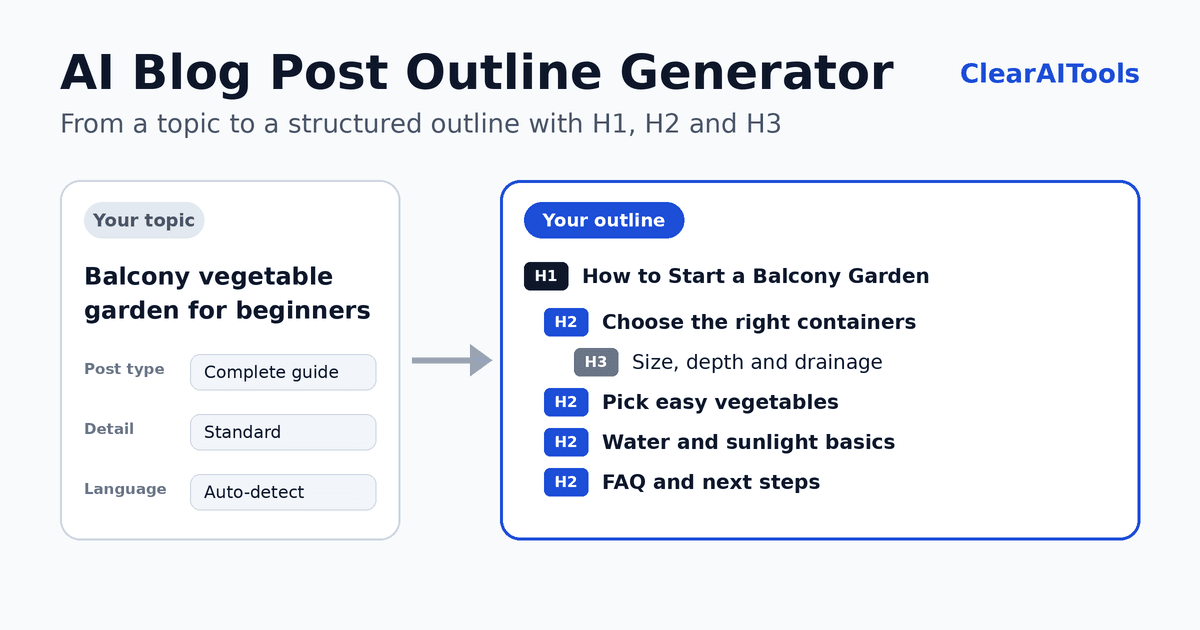
- Enter your topic or main keyword. Be as specific as you can. Click "Try an example" if you want to see how it works.
- Choose the post type. Guide, how-to, list article, beginner's guide, comparison, or review.
- Choose the level of detail. Compact (H2 only), standard (H2 and H3), or detailed.
- Add your target audience (optional). For example, "beginners living in apartments" or "small business owners."
- Choose the language. Leave it on "Same as the topic" or pick another language.
- Generate, then copy. Copy the outline as Markdown or HTML, or download it as a Markdown file.
What to Type for a Better Outline
The more specific your topic, the more useful the outline. Compare these inputs:
- Too broad: gardening
- Better: how to start a vegetable garden on a balcony
The second topic tells the tool who the article is for (people with a balcony), what they want to do (start a garden), and what kind of post makes sense (a how-to). Adding the audience gives the tool even more to work with. A narrow topic also gives you a better chance of writing something more helpful than what already exists.
Which post type should you choose?
| Post type | Structure | Good for |
|---|---|---|
| Complete guide | Definition, main subtopics, examples, resources, mistakes, FAQ. | Broad topics that deserve a long, thorough article. |
| Step-by-step how-to | What you need, steps in order, common mistakes, troubleshooting. | Tutorials and practical instructions. |
| List article | A numbered title with one H2 per item. | Tips, tools, ideas, and "ways to" topics. |
| Beginner's guide | What it is, why it matters, key concepts, how to start. | Topics for readers who are new to a subject. |
| Comparison | Criteria, one section per option, a side-by-side summary, who should choose which. | "A vs B" and "best X for Y" posts. |
| Review | Who it is for, what to test, strengths, limitations, alternatives, verdict. | Products or services you have actually used. |
What You Get in the Result
- Title (H1): A specific title under about 60 characters, with a length check.
- Draft meta description: A starting point of about 140 to 155 characters, with a length check. You can refine it with the AI Meta Description Generator.
- URL slug: A short, readable address for the post.
- Search intent: Whether readers are mostly looking for information, a comparison, or something to buy.
- Outline: H2 and H3 headings with concrete bullets that describe what to cover in each section.
- "Add:" notes: Reminders of what only you can supply, such as a personal experience, a screenshot, or a result you measured.
- FAQ: Questions that readers are likely to ask, each with a note on how to answer.
Example Outline
Here is a shortened example for the topic "how to start a vegetable garden on a balcony." This is an illustrative example.
- Explain why size and drainage matter for roots.
- Compare pots, grow bags, and rail planters.
- Add: a photo of your own setup and what you would change.
- Tell readers to confirm limits with their building rules.
- List a few easy options and what each needs (sun, space, time).
- Add a current planting calendar for your region from a reliable source.
- Answer by plant type, and name which ones tolerate less light.
- Give one simple first step the reader can do today.
Notice that the outline does not state facts or figures. Where a number would help, it tells you to add one from a reliable source. You should do the same: look up and verify every statistic before you publish it.
Why Plan the Structure First?
- Readers can scan. Clear headings let people find the part they need.
- Search engines understand the page. Headings help describe how the content is organized. They do not guarantee rankings, but a clear structure makes your content easier to understand for people and search engines.
- You write faster. Each section has a purpose, so you spend less time deciding what comes next.
- You avoid gaps and repetition. A plan shows what is missing before you start writing.
How to Check Search Intent Yourself
Search intent is the reason behind a search. Before you write, search for your keyword and look at the first page of results:
- What type of content ranks? Step-by-step guides, lists, comparisons, or product pages tell you what readers expect.
- What questions appear? Related questions and suggestions show what people want answered.
- What is missing? Look for gaps you can fill with your own experience, a clearer explanation, or a better example.
Use the generated outline as a starting point, then adjust it based on what you find.
How to Turn the Outline Into a Good Post
- Start with the sections you know best. You do not have to write in order.
- Fill each "Add:" note. Real experience, original examples, and your own screenshots or results are what make a post different from every other one on the topic.
- Verify every fact. Add figures, names, and claims only from sources you trust, and link to them where it helps readers.
- Write the introduction last. It is easier to introduce a post once you know what it contains.
- Edit the headings. Make sure they sound natural and match the way your readers speak.
- Add internal links. Link to related posts and tools on your site where they help the reader.
- Review before you publish. Read it aloud, fix unclear sentences, and check the meta description.
Heading Best Practices
- Use one H1 per page, normally the post title.
- Use H2 for main sections and H3 only inside an H2. Do not skip levels.
- Make headings descriptive, so a reader can understand the article from the headings alone.
- Use your keyword naturally. Do not repeat it in every heading.
- Keep headings parallel in style. For example, start list items with the same kind of word.
Limits and Responsible Use
Important: An outline is a plan, not a finished article. Publishing a post made only from generic AI text, with no original experience or checking, is unlikely to help your readers or your site.
- No keyword data. The tool does not show search volume or competition. Use tools such as Google Search Console or Google Keyword Planner for that.
- No live research. The tool does not browse the web or see what is ranking today.
- Outlines can overlap with others. Similar topics may produce similar structures, so add your own angle.
- Check specifics. Verify product features, prices, and statistics before you publish.
- Privacy. Your topic is sent to an AI service to create the outline. This site does not intentionally save it, but we cannot control how the AI provider handles data. Do not enter confidential information. See our Privacy Policy.
Checklist Before You Start Writing
- Does the title promise something specific and honest?
- Does the outline match what readers want when they search this topic?
- Is each heading clear on its own?
- Do you have your own experience or an example for at least three sections?
- Do you know where you will get your facts from?
- Is there a clear next step for the reader at the end?
More Free Writing Tools
- AI Meta Description Generator: write and check the search snippet for your post.
- AI Paragraph Expander: develop a short point into a fuller paragraph.
- AI Text Summarizer: summarize your sources before you write.
- AI Paraphrasing Tool: rephrase a sentence in your own draft.
Frequently Asked Questions
Is the blog post outline generator free?
Yes. You can use it without paying and without creating an account. To prevent abuse, we limit how many requests can be made per minute.
Will an outline help my post rank higher?
There is no guarantee. A clear structure makes your content easier to read and understand, but rankings depend on many factors, including how helpful and original your content is.
Does it write the whole article?
No. It creates a plan with headings and talking points. You write the article, adding your own experience and verified facts.
Does it detect my language?
Yes. By default, the outline is written in the same language as your topic, and the detected language is shown above the result. You can also choose another language. Results are usually strongest in widely used languages, so review other languages carefully.
How many H2 headings should a blog post have?
It depends on the topic and length. The "Standard" setting usually gives six to eight H2 sections, and "Compact" gives five to six. Use as many as your reader needs, and no more.
Can I use it for essays or reports?
You can use the structure as a starting point for essays and reports. Follow your school's or employer's rules about AI tools, and cite your sources.
Can I edit the outline?
Yes, and you should. Copy it as Markdown or HTML, then change headings, remove sections, and add your own points.
Does it include statistics or sources?
No. The tool is instructed not to invent statistics or sources. Where a number would help, it reminds you to add one from a reliable source.