
Tip: add your key points for chapters that match your video. Press Ctrl + Enter (Cmd + Enter on Mac) to generate.
Last updated: October 2026
How to Use the YouTube Description Generator
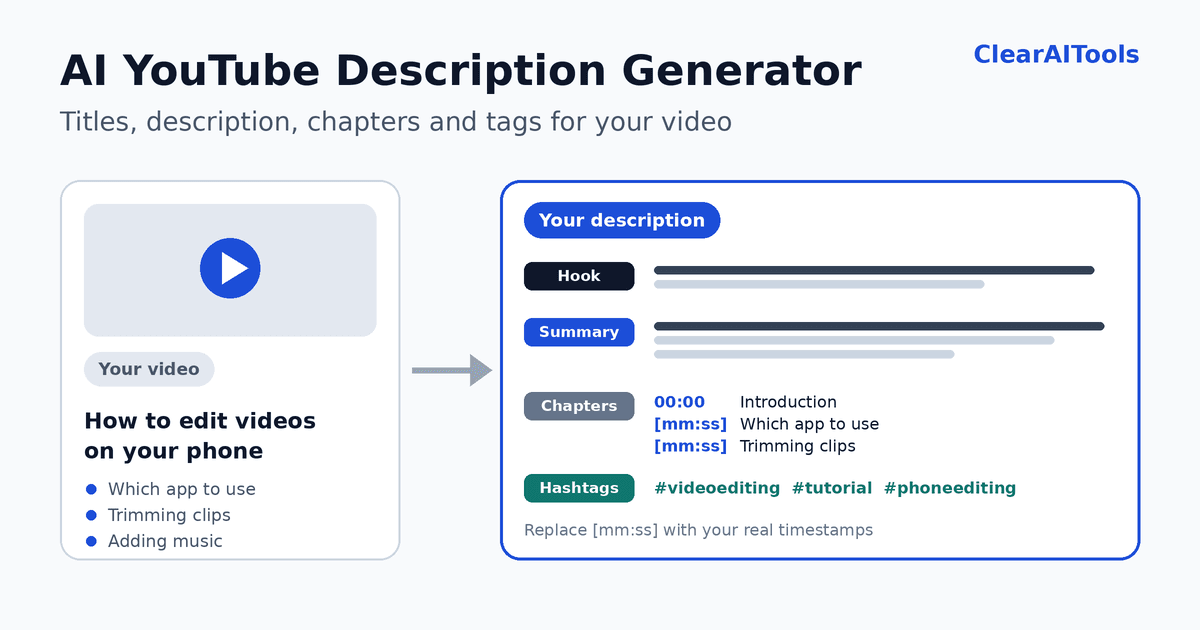
A good video description tells viewers what they will get, gives YouTube context about your video, and points people to your next step. Writing one for every upload takes time. This free tool creates a complete draft: three title ideas, a description with a hook, a summary, chapters, a call to action, link placeholders, and hashtags, plus a list of tags for YouTube Studio. You choose the video type, tone, language, and which sections to include.
In short: Enter your video title, add what the video covers (one point per line), and click “Generate description.” The tool detects the language of your title and writes in the same language by default. Then replace the placeholders, such as the chapter times and links, with real ones before you publish.
- Enter your video title or topic. Click “Try an example” to see how it works.
- List what the video covers (optional). Write one point per line, in the order they appear. These become your chapter titles.
- Choose the video type and tone. Tutorial, review, explainer, vlog, interview, or YouTube Short.
- Add a main keyword and channel name (optional). The keyword is used naturally, and the channel name appears in the call to action.
- Choose what to include. Chapters, a call to action, link placeholders, and hashtags.
- Generate, review, and copy. Copy the description, titles, and tags separately, or download everything as a text file.
What the Generator Creates
| Part | What it does |
|---|---|
| Title ideas | Three honest alternatives under about 70 characters, with a length check. |
| Hook | The first lines viewers see before they expand the description. The tool shows a preview of roughly the first 150 characters. |
| Summary | What viewers will learn or see, using your keywords naturally. |
| Chapters | Chapter titles from your key points, with placeholders for the real times. |
| Call to action | A friendly invitation to like, subscribe, or comment. |
| Links | Placeholders for your channel, website, and social profiles. |
| Hashtags | Three to five relevant hashtags, most important first. |
| Tags | A list of search phrases for the Tags field, with a length check. |
Why Chapters Use Placeholders Instead of Real Times
The tool cannot watch your video, so it cannot know when each part starts. Made-up timestamps would send viewers to the wrong place, or stop your chapters from appearing at all. That is why the generator writes 00:00 for the introduction and [mm:ss] for the rest. You fill in the real times.
According to YouTube Help, to add your own chapters:
- The first timestamp must start at 00:00.
- You need at least three timestamps, in ascending order.
- Each chapter must be at least 10 seconds long.
If these rules are not met, chapters do not appear. To find your times, play the video in YouTube Studio or your editor and note where each new section begins.
Anatomy of a Good YouTube Description
- The first two lines. Viewers see these before they click “Show more” (and in some search results), so put the main keyword and the main benefit here.
- A short summary. Two to four sentences about what the video covers and who it is for.
- Chapters. Help viewers jump to the part they want.
- A clear next step. One request, such as watching a related video or subscribing.
- Links. Your website, social profiles, and any resources mentioned in the video.
- A few hashtags. YouTube usually shows the first three above the video title, so choose them carefully.
Example: a description from the generator, after editing
This is an illustrative example for a tutorial video.
Learn how to edit videos on your phone for free, step by step, with no editing experience.In this beginner tutorial you will see which free app to use, how to import and trim clips, how to add text and music, and how to export in good quality.Chapters: 00:00 Introduction 00:42 Which free app to use 02:10 Importing and trimming clips 04:35 Adding text and music 06:50 Exporting in good qualityIf this helped, subscribe to [channel name] for more beginner tutorials.Subscribe: [channel link] Website: [website link]#videoediting #phoneediting #tutorial
Notice that the chapter times in the edited version are real numbers from the creator’s video, while the generator would have shown them as [mm:ss].
YouTube Details to Know
- Length limits. Descriptions can be up to 5,000 characters, and the Tags field up to 500 characters. The tool shows both counts.
- No angle brackets. YouTube does not allow the less-than and greater-than characters in descriptions, so the tool never uses them.
- Hashtags. Use a few that are truly relevant. The first three usually appear above the title.
- Tags matter less than you might think. YouTube has said that tags play a minimal role in helping viewers find a video. Your title, thumbnail, and description matter more.
- Links. Paste the full address, including https://, so it is clickable.
- Shorts. Short descriptions work best. The tool writes a brief one and can add #Shorts.
Does a Better Description Help Your Video Rank?
It can help, but nobody can promise it. A clear title and description help viewers decide to watch, and they give YouTube context about your video. Ranking and recommendations also depend on how viewers respond, such as how many click, how long they watch, and whether they return. Treat the description as one part of a good video, not a shortcut.
Common Mistakes
- Keyword stuffing. Repeating phrases or adding long lists of unrelated keywords makes the description worse for people.
- Misleading information. Titles, descriptions, or hashtags that do not match the video can violate YouTube’s policies on misleading metadata.
- Wrong chapter times. Fake or unchecked timestamps frustrate viewers and can stop chapters from showing.
- Hiding the point. Put the main benefit in the first lines, not after a long list of links.
- Forgetting disclosures. If your video includes paid promotion, sponsorship, or affiliate links, follow YouTube’s paid promotion settings and the advertising rules where you live.
- Publishing the draft unchanged. Replace every placeholder, and check the facts.
Get Better Results With a Transcript
If you have a transcript or script, paste it into the AI Text Summarizer with the “Key points” format. Then use those points as the “What the video covers” list here. This gives you chapter titles that follow your actual content.
Limits and Responsible Use
Important: The tool writes from the information you enter. It does not watch, hear, or check your video. Review every sentence, and make sure the description is accurate and honest.
- No video analysis. It does not know your real timestamps, guests, products, prices, or results unless you provide them.
- No keyword research. It does not show search volume or competition. Use YouTube search suggestions and YouTube Studio analytics to research your topic.
- Check before you publish. Replace all [placeholders] and confirm links work.
- Privacy. Your text is sent to an AI service to create the result. This site does not intentionally save it, but we cannot control how the AI provider handles data. Do not enter confidential information. See our Privacy Policy.
Checklist Before You Publish
- Does the title promise only what the video delivers?
- Do the first two lines contain the main keyword and the main benefit?
- Have you replaced every [mm:ss] with a real time, starting at 00:00, with at least three chapters of 10 seconds or more?
- Do all links work, and are sponsorships or affiliate links disclosed?
- Are the hashtags relevant, and is the best one first?
- Is the description under 5,000 characters?
More Free Writing Tools
- AI Text Summarizer: turn a transcript into key points.
- AI Blog Post Outline Generator: plan a blog post or video script structure.
- AI Meta Description Generator: write the search snippet for your website pages.
- AI X Thread Maker: share your video with a thread.
Frequently Asked Questions
Is the YouTube description generator free?
Yes. You can use it without paying and without creating an account. To prevent abuse, we limit how many requests can be made per minute.
Why are the chapter times shown as [mm:ss]?
The tool cannot watch your video, so it cannot know the real times. Replace the placeholders with the times from your video. The first chapter must be 00:00, and you need at least three chapters of 10 seconds or more.
Will this description make my video rank higher?
There is no guarantee. A clear, accurate description helps viewers and gives YouTube context, but ranking depends on many factors, including how viewers respond to your video.
Does it detect the language of my title?
Yes. By default, the result is written in the same language as your title, and the detected language is shown above the result. You can also choose another language. Results are usually strongest in widely used languages, so review other languages carefully.
How many hashtags should I use?
A few relevant ones are enough. The tool suggests three to five. YouTube usually shows the first three above the title, so put the most important first.
Can I use it for YouTube Shorts?
Yes. Choose “YouTube Short” as the video type. The tool writes a brief description and can include #Shorts. Chapters and links are turned off for Shorts.
What is the maximum length of a YouTube description?
5,000 characters. The tool shows the character count of your result, and it aims to stay well under the limit.
Do I need to add tags?
Tags are optional and play a small role in discovery. They are most useful for common misspellings or alternative names for your topic. The tool provides a list you can copy if you want it.
Can I use it for podcasts or interviews?
Yes. Choose “Interview or podcast,” enter the topic and the main points discussed, and the tool will write a description and chapter titles for the episode.